FITIV Pulse's Weight Management gives your weight a destination, not just a trend line. Set a target weight and a pace, and FITIV breaks the journey into milestones you can actually hit, with a smoothed trend line that cuts through the daily noise so you know whether you're on pace, regardless of what the scale said this morning. It works whether you're trying to lose weight or gain it.
Set a Weight Goal
Setting a goal takes three steps:
- Goal Weight: pick your starting point (any weight you've logged, or a past date) and your goal weight. FITIV shows the total to lose or gain.
- Target Pace: choose how fast you want to go, see your projected finish date, and turn on weigh-in reminders if you want them.
- Review Goal: check your weekly pace, estimated finish, and how long it should take, then save.
Choose Your Pace
FITIV offers six pace levels, from easiest to sustain to most demanding:
| Pace | Per week |
|---|---|
| Gentle | 0.5 lb (0.25 kg) |
| Recommended | 1 lb (0.5 kg) |
| Steady | 1.5 lb (0.75 kg) |
| Ambitious | 2 lb (1 kg) |
| Aggressive | 2.5 lb (1.25 kg) |
| Extreme | 3 lb (1.5 kg) |
The two fastest paces are flagged in red, with a note to consider clinical guidance. The CDC notes that people who lose weight gradually, at about 1 to 2 pounds a week, are more likely to keep it off (CDC). If you're aiming for the faster end, it's worth talking with your healthcare provider.
Choose How Progress Is Measured
Your weight moves from day to day with water, meals, and sleep, so FITIV lets you pick which number drives your progress bar and milestones:
- 7-Day Low (the default): the lowest weight you hit in the past week. A good fit when you're losing weight.
- 7-Day Average: smooths daily noise into a steady trendline.
- 7-Day High: the highest weight in the past week. A good fit when you're gaining.
- Current Weight: today's reading, which reacts to every meal and bad night's sleep.
Your logs don't change; this only decides how progress is counted.
Track Your Progress
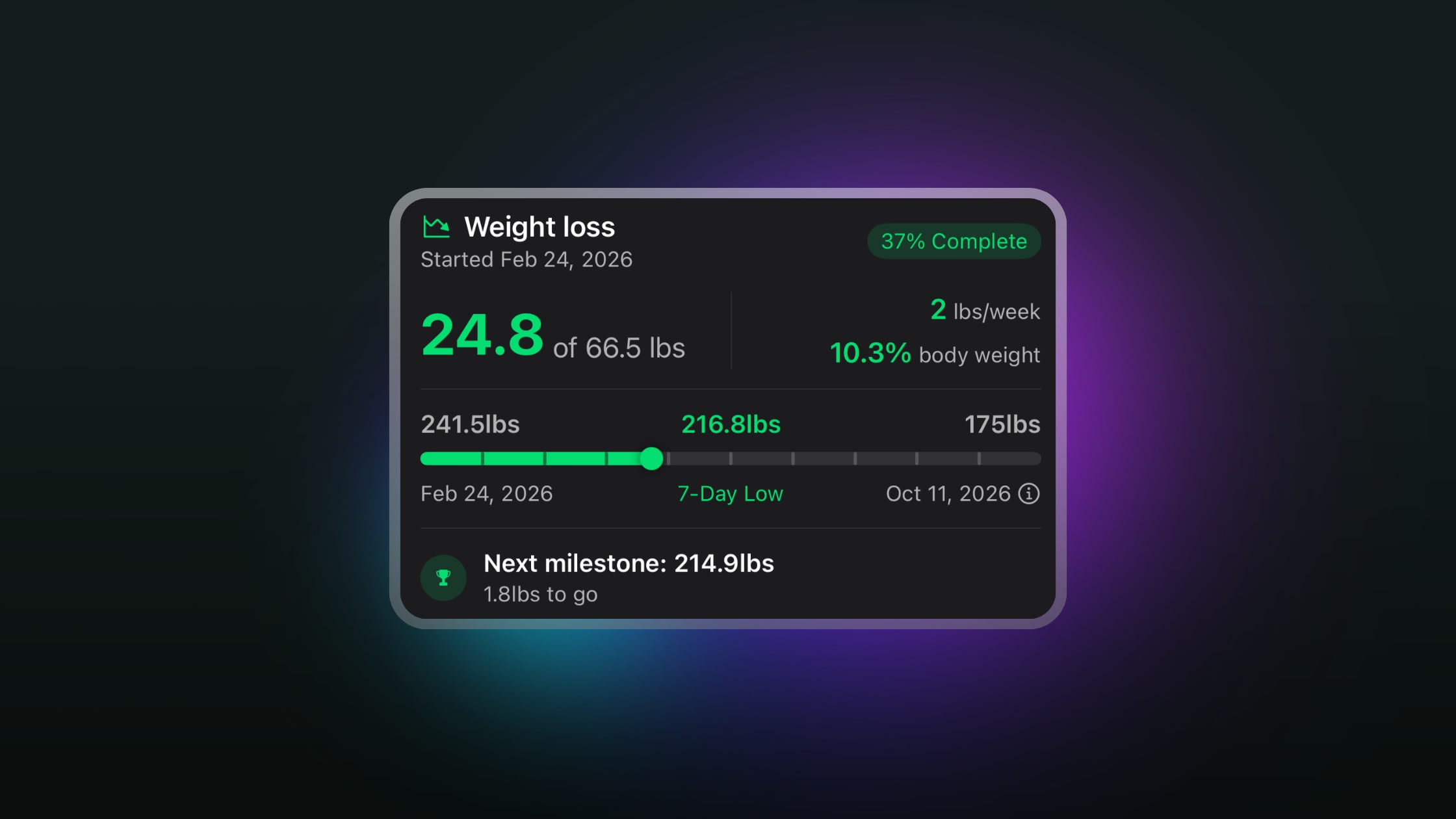
Your goal progress card puts the key numbers in one view: how far you've come out of your total, your actual pace per week, how much of your body weight you've lost or gained, your percent complete, and your next milestone.
- Milestones: FITIV breaks your goal into evenly spaced milestones, so there's always a next step in reach. When you hit a milestone or reach your goal, FITIV celebrates it with a shareable card.
- Estimated finish: your projected finish date starts from your chosen pace, then updates from your actual pace as you log, once you're trending toward your goal.
- Weigh-in reminders: daily or weekly reminders at a time you choose, with an optional follow-up if you haven't logged yet.
See the Trend, Not the Noise
The daily scale reading is noise; the trend is a signal. FITIV's weight chart is built around your 7-day moving average, with your daily weigh-ins shown as dots around it and a band comparing your 7-day and 30-day averages.
- Ranges: view your weight over 7 days, 30 days, 90 days, 6 months, 1 year, or 2 years, as a trend line or as change bars.
- Stats: your trend per week, your average, and your lowest and highest weights with their dates.
- Trends: your change over periods from 3 days to 2 years, calculated using your 7-day moving average.
- Since last entry: a heat map where each square is a day, colored by how your weight moved from your previous reading: green for a drop, red for a rise, gray for barely a change.
Weighing in regularly helps the trend do its job.
Share Your Progress
Shareable progress cards put your key stats in context, not just a number. Choose from five templates, including a chart and a photo background, and choose whether to show your start and current weight.
Apple Health, Widgets, and Apple Watch
- Apple Health: weigh-ins you log in FITIV are saved to Apple Health, and readings from a smart scale or other apps show up automatically. Your weight log marks which entries you logged in FITIV and which came from Apple Health.
- Widgets: Weight Progress, Weight Goal, and Weight Change widgets for your Home Screen, plus Lock Screen widgets.
- Apple Watch: log your weight from the FITIV watch app, and add Weight and Weight Goal complications to your watch face.
- Units: pounds or kilograms.
Weight Management with GLP-1 Medication
On a GLP-1 medication like Ozempic, Wegovy, Mounjaro, or Zepbound? Weight Management works alongside FITIV's GLP-1 tracking, so your weight trend sits next to your doses, side effects, and per-dose results. Pair it with regular strength training to help protect muscle while you lose weight.
Frequently Asked Questions
Can I set a weight gain goal in FITIV?
Yes. Weight goals work for gaining as well as losing; FITIV shows your total to gain and your weekly gain, and the 7-Day High setting is a good fit for tracking progress.
Why does FITIV show a 7-day trend instead of my daily weight?
Your weight moves from day to day with water, meals, and sleep. The 7-day moving average smooths that out, so you can see whether you're actually on pace.
How fast should I lose weight?
The CDC suggests about 1 to 2 pounds a week; people who lose weight gradually are more likely to keep it off. FITIV's Recommended pace is 1 lb (0.5 kg) a week, and the two fastest paces come with a note to consider clinical guidance. Your healthcare provider can help you choose the right pace for you.
Does FITIV sync weight with Apple Health and smart scales?
Yes. Weigh-ins you log in FITIV are saved to Apple Health, and readings from smart scales or other apps that write to Apple Health appear automatically.
Can I log my weight from my Apple Watch?
Yes. The FITIV watch app has a Weight card with a Log Weight button, and you can add Weight and Weight Goal complications to your watch face.